Quick answer: Instagram doesn’t notify you when someone unfollows. To see who unfollowed you, use a browser extension like Unfollowers Tracker that works without your password, or manually compare your follower list over time.
Why Does Instagram Hide Unfollowers?
Ever noticed your follower count drop but couldn’t figure out who left? You’re not alone. Millions of Instagram users face this same frustration every day.
Instagram deliberately doesn’t show unfollower notifications. Here’s why:
- Reduce social anxiety – Getting notified every time someone unfollows would create negative emotional experiences
- Prevent revenge unfollowing – Mass unfollow chains would damage the platform’s engagement metrics
- Keep users on the platform – Hiding unfollowers reduces reasons for people to leave Instagram
- Minimize conflicts – Knowing exactly who unfollowed you could lead to awkward confrontations
Understanding why people unfollow can help you improve your content strategy and reduce future unfollows.
While Instagram’s reasoning makes sense from their perspective, it leaves users like you in the dark about important audience changes.
The good news? There are several safe and effective ways to track who unfollowed you on Instagram in 2026.
Method 1: Use a Browser Extension (Safest & Easiest)
The fastest and safest way to see who unfollowed you on Instagram is using a browser extension that never asks for your password.
Why Unfollowers Tracker Is the Top Choice
Unfollowers Tracker is a Chrome extension specifically designed for this purpose. Here’s why it stands out:
- No password required – Works directly in your browser using your existing Instagram session
- 100% Instagram-compliant – Doesn’t violate Instagram’s Terms of Service
- Local processing – Your data stays on your computer, never uploaded to external servers
- Free to use – No hidden fees or premium features locked behind paywalls
- Instant results – See your unfollowers in seconds, not hours
How to Use Unfollowers Tracker
- Install the extension from the Chrome Web Store
- Log into Instagram in your Chrome browser
- Go to your profile and click the extension icon
- View your unfollowers instantly
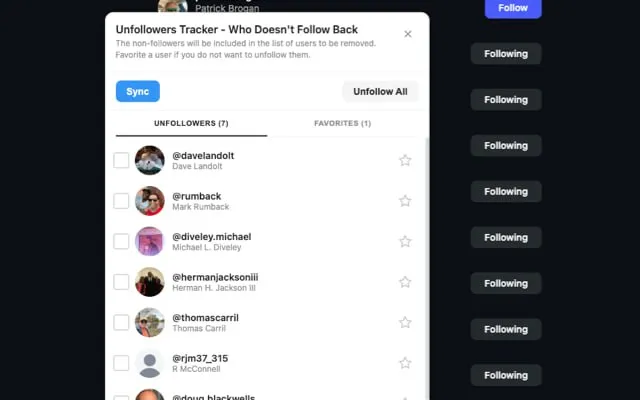
The extension compares your current follower list with previous snapshots to identify who unfollowed you. Run it regularly (daily or weekly) to track changes over time.
Using a reliable tool to how to see who unfollowed you on instagram is essential for maintaining a healthy Instagram presence.
Why Browser Extensions Are Safer Than Mobile Apps
Most mobile unfollower apps pose serious risks:
| Risk | Mobile Apps | Browser Extensions |
|---|---|---|
| Password theft | High risk | No password needed |
| Account ban | Common | Rare (if compliant) |
| Data harvesting | Frequent | Runs locally |
| Malware | Possible | Chrome’s security |
| API violations | Most violate | Uses public data |
Browser extensions like Unfollowers Tracker work within your existing Instagram session, mimicking normal user behavior. This makes them significantly safer than apps that require login credentials.
Method 2: Download Your Instagram Data
Instagram lets you download all your account data, including your complete followers and following lists. This official method is 100% safe but requires more manual work.
For a detailed walkthrough with screenshots, check out our complete guide: How to Export Instagram Data for Unfollowers Check.
Quick Steps
- Open Instagram and go to Settings
- Navigate to Accounts Center > Your information and permissions
- Select “Download your information”
- Choose “Some of your information” and select only “Followers and following”
- Choose JSON format and request the download
- Wait for Instagram’s email (usually 15-30 minutes)
Where to Find Your Followers List
Your followers list is located at:
connections/
└── followers_and_following/
    ├── followers_1.json
    └── following.json
How to Compare Lists
Use our free Analyze Tool to instantly compare your followers and following lists:
- Upload your
followers_1.jsonfile - Upload your
following.jsonfile - See who doesn’t follow you back instantly
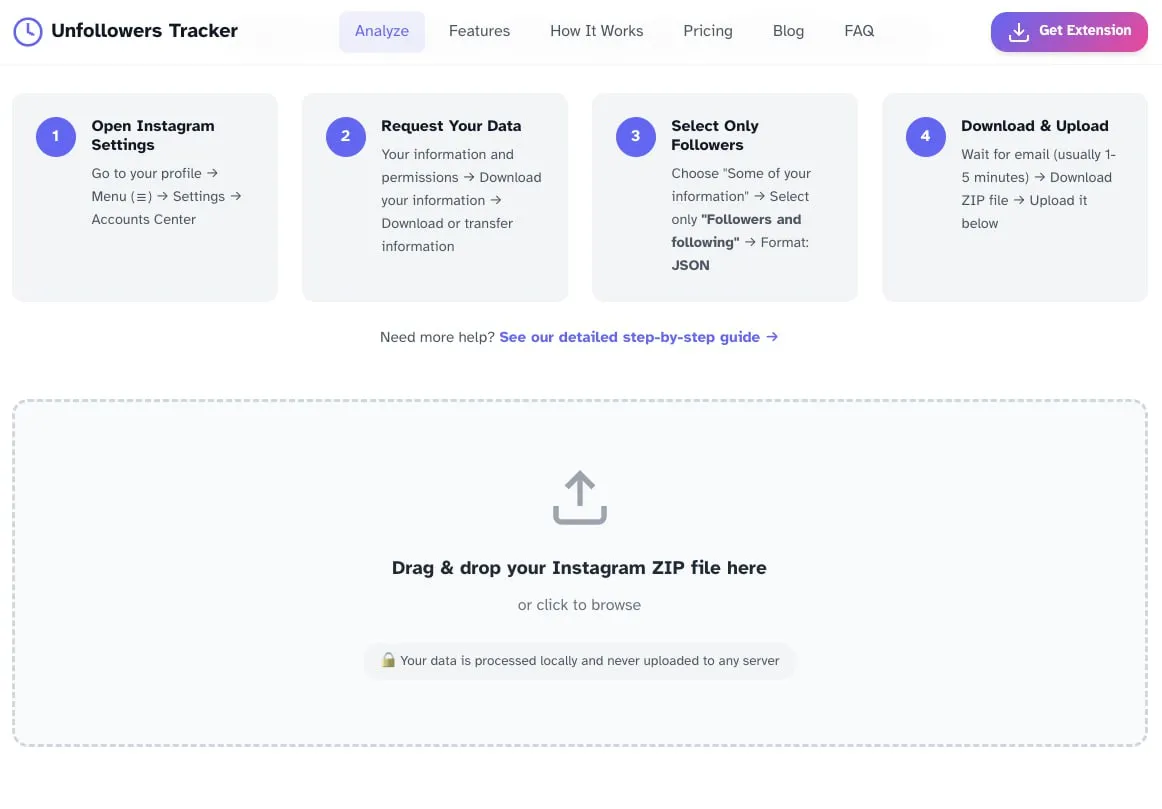
No login required, all processing happens in your browser.
Method 3: Check Manually (For Small Accounts)
If you have fewer than 500 followers, you can track unfollowers manually. This method is tedious but completely free and safe.
Many users search for ways to how to see who unfollowed you on instagram safely without risking their accounts.
How to Do It
- Go to your Instagram profile and tap “Followers”
- Search for specific usernames you suspect may have unfollowed
- If they don’t appear, they’ve either unfollowed you, blocked you, or deleted their account
Keep a Running List
For ongoing tracking:
- Screenshot your followers list weekly
- Compare screenshots to spot changes
- Use a simple spreadsheet to track follower counts by date
This method works but becomes impractical as your account grows. For accounts over 1,000 followers, use a browser extension instead.
The ability to how to see who unfollowed you on instagram has become increasingly important for content creators.
Method 4: Use ChatGPT to Analyze Your Data
A creative approach that went viral in late 2024: using ChatGPT to compare your Instagram data exports.
When you how to see who unfollowed you on instagram, you gain valuable insights into your audience behavior.
How It Works
- Download your Instagram data (followers and following lists)
- Upload the JSON files to ChatGPT (requires Plus subscription)
- Ask ChatGPT: “Compare these lists and show me who doesn’t follow me back”
Limitations
- Requires ChatGPT Plus ($20/month)
- Can’t track unfollowers over time (only shows current non-followers)
- File size limits may apply for large accounts
- Not designed for this purpose – results can be inconsistent
While clever, this method is more of a novelty than a practical solution. A browser extension provides better results with less effort.
Methods to Avoid (Dangerous!)
Many Instagram unfollower tools will compromise your account. Here’s what to avoid:
🚨 Apps That Ask for Your Password
Never give your Instagram password to any third-party app. These apps can:
- Access your DMs and private messages
- Post spam from your account
- Sell your credentials on the dark web
- Lock you out of your own account
Popular apps like Followmeter, Reports+, and Followers Insight have been caught misusing user credentials. Even if an app seems legitimate, Instagram passwords should never be shared.
Learning to how to see who unfollowed you on instagram effectively can help improve your engagement rates.
🚨 Apps That Violate Instagram’s API
Apps using Instagram’s private (undocumented) API trigger security flags. Consequences include:
- Temporary action blocks – Can’t like, follow, or comment for days
- Permanent account suspension – Your account gets deleted
- Shadowbans – Your posts stop appearing in feeds and hashtags
Instagram actively detects and bans accounts using unauthorized apps. The risk isn’t worth it.
🚨 “Follower Growth” Apps With Tracking Features
Apps promising to grow your followers while also tracking unfollowers are almost always scams. They typically:
- Use bots that get your account flagged
- Follow/unfollow from your account without permission
- Engage with spam accounts in your name
Stick to tools that only read your follower data—never ones that take actions on your behalf.
Why People Unfollow on Instagram
Understanding why people unfollow can help you retain more followers. Common reasons include:
1. Content Isn’t Relevant Anymore
Your interests evolved, but your content didn’t match their expectations. This is especially common when:
- You pivot your niche
- You post too much personal content
- Your content quality drops
2. Posting Too Much or Too Little
- Overposting (5+ times daily) overwhelms feeds
- Underposting (less than weekly) makes followers forget you exist
The sweet spot for most accounts is 1-2 posts per day with consistent Stories.
3. Follow-Unfollow Tactic
Some accounts follow you just to get a follow back, then unfollow shortly after. These aren’t real followers—they’re using a growth hack that’s been around since 2015.
4. Cleaning Up Their Feed
Many users periodically unfollow accounts to reduce noise. If they followed hundreds of accounts, you might get caught in the cleanup—nothing personal. If you want to clean up your following list too, there are safe ways to do it without triggering Instagram’s spam filters.
5. Inactive Accounts or Bots
Instagram regularly purges fake and inactive accounts. You might “lose” followers who were never real people.
How to Track Unfollowers Over Time
One-time unfollower checks are useful, but ongoing tracking reveals patterns. Here’s how to set up a tracking system:
Weekly Tracking Routine
- Every Sunday: Run Unfollowers Tracker and note your follower count
- Record changes: Screenshot or export your unfollower list
- Look for patterns: Do certain post types cause more unfollows?
What to Track
- Total unfollowers per week
- Types of accounts that unfollow (businesses, personal, influencers)
- Timing correlations (unfollows after specific posts)
- Net follower change (new followers minus unfollowers)
When Unfollowers Actually Matter
Not all unfollowers are worth worrying about:
- Bots and fake accounts – Good riddance
- Follow-unfollow accounts – They were never engaged
- Mass unfollowers – Often cleaning up, not targeting you
Focus on unfollowers who were genuinely engaged. If active followers start leaving, that’s a signal to evaluate your content strategy. You can track your follower growth with analytics tools to understand these patterns better.
Protecting Your Account While Tracking Unfollowers
Safety should always come first. Follow these guidelines:
✅ Do
- Use browser extensions that don’t require passwords
- Download official Instagram data exports
- Check the Chrome Web Store reviews before installing extensions
- Use tools that process data locally on your device
❌ Don’t
- Share your password with any third-party app
- Use apps that require Instagram login
- Install extensions with few reviews or suspicious permissions
- Trust apps promising “unlimited” or “instant” follower growth
Signs of a Suspicious Tool
Watch for these red flags:
- Asks for Instagram username AND password
- Promises features that seem too good to be true
- Has mostly 5-star reviews (often fake)
- Requires access to contacts, photos, or other unrelated permissions
- Made by unknown developers with no online presence
FAQ: Instagram Unfollower Questions
Can I see who unfollowed me on Instagram for free?
Yes! Use a free browser extension like Unfollowers Tracker or download your Instagram data and compare followers lists manually. Both methods are completely free.
Does Instagram notify you when someone unfollows?
No. Instagram does not send notifications when someone unfollows your account. This is intentional—the platform wants to minimize negative social experiences.
Why can’t I see who unfollowed me on Instagram?
Instagram doesn’t provide this feature in the app. You need to use third-party tools or manual tracking methods to identify unfollowers.
Is it safe to use unfollower apps?
Most mobile unfollower apps are NOT safe—they often steal passwords or violate Instagram’s terms. Browser extensions that don’t require your password (like Unfollowers Tracker) are much safer since they work within your existing session.
How often should I check for unfollowers?
Weekly is ideal for most accounts. Checking daily can become obsessive and isn’t necessary unless you’re running major campaigns. Focus on patterns over time rather than individual unfollows.
Can someone see if I check if they unfollowed me?
No. Neither Instagram nor any legitimate tracking tool will notify users that you’ve checked your unfollower list. Your tracking is completely private.
Why am I losing followers when I’m not doing anything wrong?
Common reasons include:
- Instagram purging bot/fake accounts
- Normal audience turnover
- Followers cleaning up their feed
- Algorithm changes affecting your visibility
- Posting frequency changes
Can I get banned for using an unfollower tracker?
Not if you use a compliant tool like a browser extension. However, apps that violate Instagram’s API can lead to temporary or permanent bans. Always choose tools that don’t require your password and don’t automate actions.
What’s the difference between unfollowers and non-followers?
- Unfollowers = People who previously followed you but stopped
- Non-followers = People you follow who don’t follow you back
Both metrics are useful for managing your Instagram strategy.
Should I unfollow people who unfollow me?
That’s your choice. Some users prefer maintaining a balanced follow ratio, while others don’t care. Don’t obsess over it—focus on creating content your actual followers enjoy.
Conclusion
Seeing who unfollowed you on Instagram is straightforward once you know the right methods:
- Best option: Use Unfollowers Tracker browser extension (free, safe, instant)
- Official method: Download your Instagram data and compare follower lists
- Manual method: Check individual profiles (only practical for small accounts)
- Avoid: Any app asking for your Instagram password
Remember, losing some followers is normal. Focus on understanding patterns rather than obsessing over individual unfollows. Use the insights to improve your content strategy, not to chase people who left.
Ready to find out who unfollowed you? Install Unfollowers Tracker and get your answer in seconds—no password required.