Want to check who doesn’t follow you back on Instagram? The first step is exporting your Instagram data. This detailed guide walks you through every step of the process with screenshots and tips.
If you want to check who doesn’t follow you back, exporting your data is the safest method.
Too complicated? Skip the manual export and use our Chrome Extension for real-time unfollower tracking - no data export needed!
Video Tutorial
Watch this quick video guide showing the complete export process:
Prefer reading? Follow the step-by-step guide below.
Why Export Your Instagram Data?
Instagram’s official data export feature lets you download your followers and following lists in a machine-readable format. This is the safest way to analyze your followers because:
- No password sharing - You download directly from Instagram
- No third-party access - Your data stays on your device
- Official feature - Supported by Instagram/Meta
- Complete data - Get your full follower history
Want to see who unfollowed you? Start by exporting your data using this official method.
Important: Never use apps or websites that ask for your Instagram password. The official data export is the only safe method.
Step-by-Step Guide to Export Instagram Data
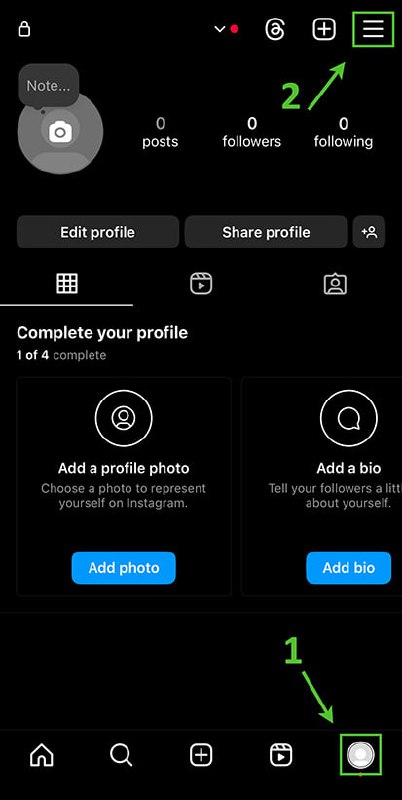
Step 1: Open Your Profile
Open the Instagram app on your phone and tap your profile picture in the bottom right corner to go to your profile page.
Step 2: Open the Menu
Tap the hamburger menu icon (☰) in the top right corner of your profile page.
Step 3: Go to Accounts Center
Scroll down and tap “Accounts Center”. This is Meta’s unified settings hub for Instagram, Facebook, and other Meta apps.
Tip: If you don’t see Accounts Center, make sure your Instagram app is updated to the latest version.
Step 4: Find Your Information Settings
In Accounts Center, tap “Your information and permissions”. This section contains all your data and privacy controls.
Step 5: Select Download Your Information
Tap “Download your information”. This is where you can request a copy of all your Instagram data.
Using a reliable tool to check instagram unfollowers is essential for maintaining a healthy Instagram presence.
Step 6: Start Creating Your Export
You’ll see options for downloading data. Tap “Download or transfer information”, then select your Instagram account.
Next, tap “Some of your information” - this lets you choose exactly what data to export.
Step 7: Select Only Followers and Following
This is the most important step:
- Tap “See all” to view all available data categories
- Tap “Deselect all” or manually uncheck everything first
- Find and select ONLY “Followers and following”
- Tap “Next” to continue
Many users search for ways to check instagram unfollowers safely without risking their accounts.
Why only Followers and Following? Selecting only this data makes the export much faster (1-5 minutes instead of hours) and the file smaller. You don’t need photos, messages, or other data for unfollower checking.
Step 8: Choose Export Settings
On the next screen, configure these settings:
- Download to device: Select this option
- Date range: Choose “All time” to get your complete history
- Format: Select “JSON” (not HTML)
Important: You MUST select JSON format. HTML format cannot be processed by our analyzer tool.
Step 9: Create the Export
Tap “Create files” to start the export process. Instagram will begin preparing your data.
Step 10: Wait for the Email
Instagram will send you an email when your data is ready. This usually takes:
- 1-5 minutes for followers/following only
- Several hours if you selected all data
Check your email inbox (and spam folder) for a message from Instagram/Meta.
Step 11: Download Your ZIP File
When you receive the email:
- Open the email from Instagram
- Tap the “Download your information” button
- You may need to log in to Instagram again for security
- Download the ZIP file to your device
Tip: On mobile, you might want to transfer the ZIP file to your computer for easier uploading.
Step 12: Upload to Our Analyzer
Now you’re ready to check your unfollowers!
- Go to our Instagram Unfollowers Checker
- Drag and drop your ZIP file into the upload area
- Wait a few seconds for the analysis
- See who doesn’t follow you back!
The ability to check instagram unfollowers has become increasingly important for content creators.
Troubleshooting Common Issues
”I can’t find Accounts Center”
Make sure your Instagram app is updated. Accounts Center was introduced in recent versions. You can also access it through:
- Instagram website (instagram.com) → Settings → Accounts Center
- Facebook app → Settings → Accounts Center
”The export is taking too long”
If you selected all your data, it can take several hours. For faster results:
- Cancel the current export
- Start a new export
- Select ONLY “Followers and following”
When you check instagram unfollowers, you gain valuable insights into your audience behavior.
”I got HTML format instead of JSON”
You’ll need to request a new export:
- Go back to Download your information
- Make sure to select JSON format
- Create a new export
”The analyzer says my file is invalid”
Common causes:
- Wrong format (HTML instead of JSON)
- Corrupted download - try downloading again
- Selected wrong data - make sure you included “Followers and following”
If you’re looking for alternative methods, check out the best unfollower trackers 2026 that work without manual data export.
Privacy & Security Tips
- Never share your ZIP file - It contains your follower data
- Delete after use - Remove the ZIP file from your device when done
- Our tool is 100% local - Your data never leaves your browser
- No account access needed - We never ask for your password
Ready to Check Your Unfollowers?
Now that you have your Instagram data exported, head over to our analyzer tool:
Check Who Doesn’t Follow You Back →
The analysis takes just seconds and shows you:
- People who don’t follow you back
- Your fans (people you don’t follow back)
- Mutual followers
- And more!
Learning to check instagram unfollowers effectively can help improve your engagement rates.
Frequently Asked Questions
How often can I export my data?
You can request a new export anytime. Instagram doesn’t limit how often you can download your data.
Is this method safe?
Yes! This is Instagram’s official data export feature. You’re downloading directly from Instagram without any third-party involvement.
Will Instagram notify people that I checked?
No. Downloading your data and analyzing it locally is completely private. No one will know you checked.
How accurate is the unfollower data?
The data is 100% accurate at the time of export. It shows your exact followers and following lists as they exist on Instagram’s servers.
Related Reading
- How to Use Unfollowers Tracker Chrome Extension
- Free Instagram Unfollow Tracker: No Password Needed
- Instagram Unfollowers Without App
Last updated: February 2026