Have you ever wondered who doesn’t follow you back on Instagram? You’re not alone. Millions of Instagram users want to know exactly who they’re following that isn’t returning the favor. Whether you’re trying to maintain a healthy follower-to-following ratio, clean up your feed, or simply curious about your Instagram relationships, this comprehensive guide will show you every method available in 2026.
Why Knowing Who Doesn’t Follow You Back Matters
Before diving into the methods, let’s understand why this information is valuable:
Maintain a Balanced Ratio: A healthy follower-to-following ratio signals credibility. If you follow 2,000 accounts but only have 200 followers, it might affect how others perceive your profile.
Clean Up Your Feed: Following accounts that don’t engage with you clutters your feed with content from people who aren’t interested in your posts. Learn how to clean up your following list effectively.
Improve Engagement Rates: When you follow fewer accounts, you’re more likely to engage meaningfully with the content you see, which can boost your own engagement.
Using a reliable tool to who doesn’t follow you back on instagram is essential for maintaining a healthy Instagram presence.
Professional Branding: For businesses and influencers, maintaining a curated following list looks more professional and intentional.
Save Time: A cleaner following list means less scrolling through irrelevant content.
Does Instagram Show Who Doesn’t Follow You Back?
Here’s the straightforward answer: No, Instagram does not have a built-in feature to show who doesn’t follow you back.
Instagram allows you to see your followers list and your following list separately, but it doesn’t compare them for you. This means you need to use alternative methods to identify non-followers.
Instagram’s design philosophy focuses on engagement and content discovery rather than follower tracking. The platform wants users to focus on creating and consuming content, not obsessing over follower counts.
Many users search for ways to who doesn’t follow you back on instagram safely without risking their accounts.
Method 1: Unfollowers Tracker Chrome Extension (Recommended)
The fastest and safest way to check who doesn’t follow you back on Instagram is using the Unfollowers Tracker Chrome extension. This browser-based tool works directly with Instagram’s web interface without requiring your password or any suspicious permissions.
Why Unfollowers Tracker is the Best Solution
No Password Required: Unlike many third-party apps, Unfollowers Tracker never asks for your Instagram login credentials. It works within your browser while you’re already logged into Instagram.
Instant Results: Get a complete list of non-followers in seconds, not hours. No waiting for data exports or manual comparisons.
100% Safe: Because it operates as a browser extension and doesn’t store your data on external servers, your account security remains intact.
The ability to who doesn’t follow you back on instagram has become increasingly important for content creators.
Free to Use: The basic functionality is completely free, making it accessible to everyone.
Works on Desktop: Perfect for users who prefer managing their Instagram on a computer rather than mobile.
How to Use Unfollowers Tracker
- Install the Unfollowers Tracker extension from the Chrome Web Store
- Navigate to Instagram.com and log into your account
- Click the extension icon in your browser toolbar
- The extension will analyze your followers and following lists
- View your complete list of accounts that don’t follow you back
Learn more about how to use the Unfollowers Tracker Chrome extension for detailed instructions.
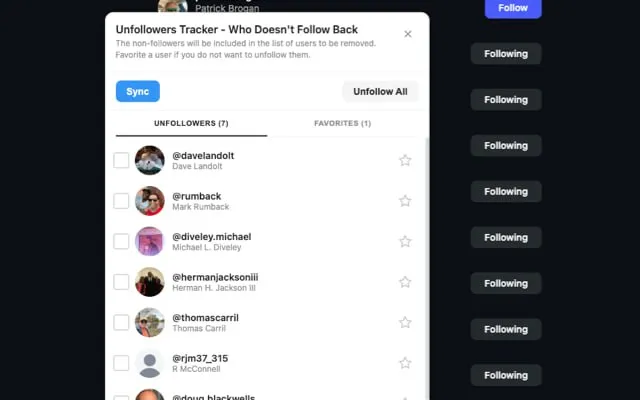
The entire process takes less than a minute, even for accounts with thousands of followers.
Method 2: Manual Checking Through Instagram
If you prefer not to use any tools, you can manually check who doesn’t follow you back directly within Instagram.
Step-by-Step Manual Method
- Open Instagram on your phone or computer
- Go to your profile and tap “Following”
- Search for a specific username you want to check
- Tap on their profile
- Look for the “Follows you” label next to the Follow button
If you see “Follows you,” that person follows you back. If the label is missing, they don’t follow you.
Pros and Cons of Manual Checking
Pros:
- Completely safe with zero risk to your account
- No apps or extensions needed
- Works on any device
Cons:
- Extremely time-consuming for large following lists
- Easy to miss accounts or make mistakes
- No way to track changes over time
- Impractical for accounts following more than 100 people
This method works best if you only want to check specific accounts rather than your entire following list.
Method 3: Instagram Data Download Method
Instagram allows you to download all your account data, including your followers and following lists. This method is completely safe and uses Instagram’s official feature.
For a detailed step-by-step guide, check out our complete tutorial: How to Export Instagram Data for Unfollowers Check.
Quick Steps to Download Your Instagram Data
On Mobile:
- Open Instagram and go to your profile
- Tap the three horizontal lines (menu)
- Go to Settings and activity > Account Center
- Select “Your information and permissions”
- Tap “Download your information”
- Choose “Download or transfer information”
- Select your Instagram account
- Choose “Some of your information”
- Scroll to “Connections” and select “Followers and following”
- Tap “Download to device” and create the files
Processing Time: Instagram may take anywhere from a few minutes to 48 hours to prepare your data, depending on your account size.
Comparing the Lists with Our Free Analyze Tool
Once you receive your data, use our free Analyze Tool to instantly compare your followers and following lists:
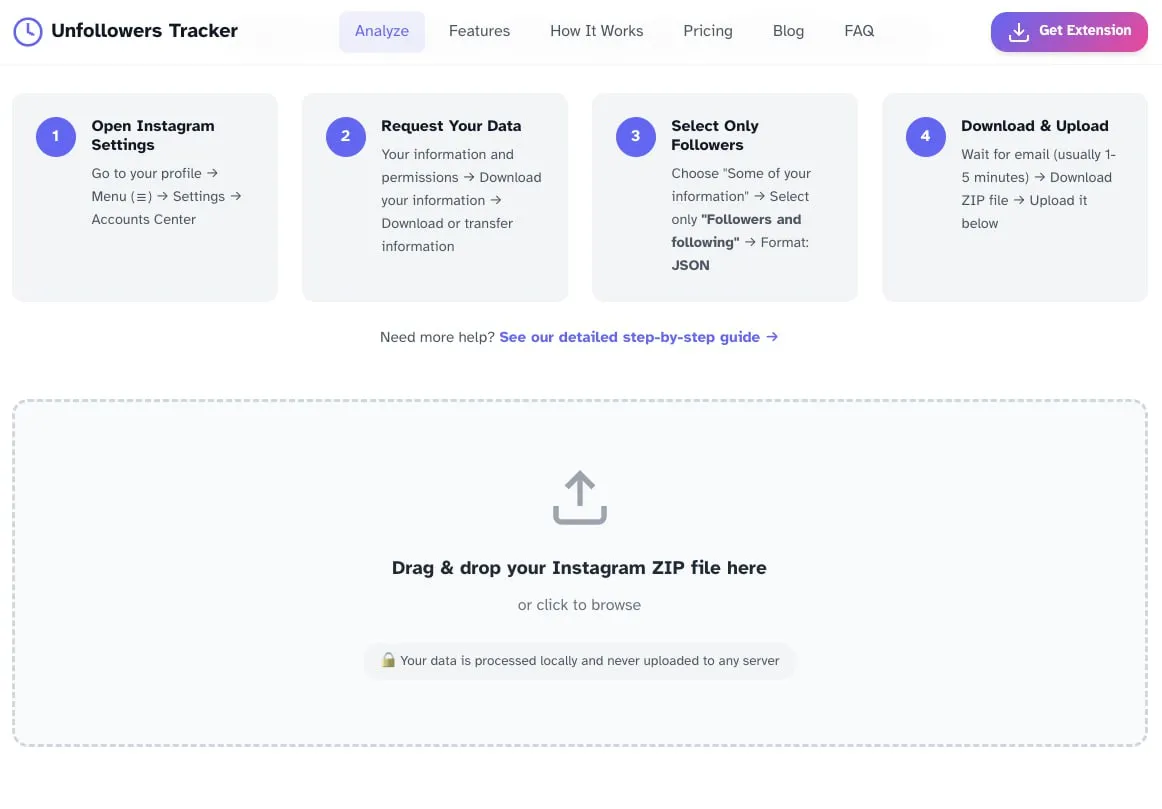
- Download and extract the ZIP file on your computer
- Go to our Analyze page
- Upload your followers and following JSON files
- Instantly see who doesn’t follow you back
Limitations of This Method
- Takes significant time to set up and process
- Data may be slightly outdated by the time you receive it
- Requires a computer for easy comparison
- Not practical for regular monitoring
Method 4: Using Instagram’s Built-in Filters
Instagram has added helpful filters within the Following tab that can help identify potential non-followers.
Available Filters
- Least Interacted With: Shows accounts you rarely engage with
- Most Shown in Feed: Displays accounts whose content appears most often
- Date Followed: Sorts by when you followed each account
How to Use Filters
- Go to your Instagram profile
- Tap “Following”
- Look for the sort/filter options at the top
- Select “Least Interacted With”
While these filters don’t directly show non-followers, accounts you rarely interact with are often the same ones that don’t follow you back. This can help you identify candidates for unfollowing without checking each profile individually.
Why You Should Avoid Most Third-Party Apps
Many apps in the App Store and Google Play claim to show who doesn’t follow you back. However, most of these apps pose serious risks:
Security Risks
Password Theft: Many apps require your Instagram password, which can be stolen and used to hack your account.
Data Harvesting: Some apps collect and sell your personal information to third parties.
Malware: Poorly designed apps may contain malicious code that compromises your device.
Account Risks
Terms of Service Violations: Using unauthorized third-party apps violates Instagram’s Terms of Service and can result in account suspension.
Action Blocks: Instagram may detect unusual activity from these apps and temporarily or permanently restrict your account.
Forced Logouts: Many users report being logged out of Instagram after using follower tracking apps.
Signs of a Dangerous App
- Requires your Instagram password
- Asks for posting or messaging permissions
- Has poor reviews mentioning account issues
- Promises features that seem too good to be true
- Isn’t from a verified developer
The Unfollowers Tracker Chrome extension avoids all these issues because it works within your browser session and never requires your password or special permissions.
Best Practices for Managing Non-Followers
Once you’ve identified who doesn’t follow you back, here’s how to handle the information wisely:
Don’t Mass Unfollow
Instagram monitors account activity closely. Unfollowing hundreds of accounts in a short period can trigger action blocks or even account suspension. Learn how to mass unfollow safely without risking your account. If you decide to unfollow non-followers:
- Limit unfollows to 50-100 per day maximum
- Spread actions throughout the day
- Take breaks between unfollowing sessions
- Mix unfollowing with normal Instagram activity
Consider the Value of Each Account
Not everyone needs to follow you back. Consider keeping accounts that:
- Post valuable content you enjoy
- Are industry leaders or inspirations
- Represent brands or products you love
- Are friends or family who don’t use Instagram actively
Focus on Quality Over Quantity
A smaller, engaged following list is more valuable than a large list of accounts you never interact with. Quality connections lead to:
- Better content in your feed
- More meaningful engagement
- Improved mental health (less comparison)
- A more authentic Instagram experience
How Often Should You Check Non-Followers?
Checking too frequently can become an unhealthy obsession. Here are recommended frequencies:
- Personal accounts: Once a month or quarterly
- Content creators: Monthly during growth phases
- Businesses: During quarterly social media audits
- New accounts: Weekly until you establish your community
Remember, Instagram success comes from creating great content and genuine engagement, not from obsessing over follower counts.
Common Myths About Instagram Non-Followers
Myth 1: Non-Followers Hurt Your Reach
Reality: Instagram’s algorithm prioritizes engagement, not mutual following. Having non-followers in your following list doesn’t directly impact your reach.
Myth 2: Successful Accounts Always Follow Back
Reality: Many celebrities, brands, and influencers follow very few accounts. Not following back is standard practice for large accounts.
Myth 3: All Follower Tracking Apps Are Accurate
Reality: Many apps provide outdated or incorrect information due to API limitations and data delays. Browser-based tools like Unfollowers Tracker that work in real-time are more reliable.
Myth 4: You Should Unfollow Everyone Who Doesn’t Follow Back
Reality: This approach ignores the value of content. Follow accounts based on the value they provide, not just whether they follow you.
Frequently Asked Questions (FAQ)
Can I see who doesn’t follow me back on Instagram without any apps?
Yes, you can check manually by visiting each profile in your following list and looking for the “Follows you” label. You can also download your Instagram data and compare the followers and following lists. However, these methods are time-consuming. The Unfollowers Tracker Chrome extension offers a faster, safer alternative that doesn’t require installing a mobile app.
Is it safe to use apps that show who unfollowed you on Instagram?
Most mobile apps that track Instagram followers pose security risks because they require your password or violate Instagram’s Terms of Service. Browser extensions like Unfollowers Tracker are safer because they work within your existing Instagram session without requiring your login credentials.
Why doesn’t Instagram show who doesn’t follow you back?
Instagram is designed to focus on content creation and engagement rather than follower tracking. The platform wants users to spend time creating and consuming content, not monitoring their follower counts. This design choice encourages healthier social media habits.
Will I get banned for checking who doesn’t follow me back?
Using Instagram’s official data download feature or manually checking profiles won’t get you banned. However, using unauthorized third-party apps that violate Instagram’s Terms of Service can result in action blocks or account suspension. Browser extensions that don’t require your password are generally safe.
How accurate are non-follower tracking tools?
Accuracy varies significantly between tools. Mobile apps often have outdated data due to API restrictions. Browser-based tools like Unfollowers Tracker that work in real-time with Instagram’s web interface tend to be more accurate because they access current data directly.
Can I see who unfollowed me on Instagram?
Instagram doesn’t notify you when someone unfollows you. To track unfollowers over time, you would need to regularly check your follower list and note any changes. Some tools, including Unfollowers Tracker, can help you monitor changes if you check periodically.
Should I unfollow everyone who doesn’t follow me back?
Not necessarily. Consider the value each account provides. If you enjoy their content, learn from their posts, or they’re friends and family, there’s no reason to unfollow just because they don’t follow back. Focus on curating a following list that enhances your Instagram experience.
How many people can I unfollow per day without getting blocked?
Instagram doesn’t publish official limits, but most experts recommend unfollowing no more than 50-100 accounts per day, spread throughout the day. Aggressive unfollowing can trigger action blocks that temporarily restrict your account activity.
Does having a lot of non-followers affect my Instagram algorithm?
No, the number of non-followers in your following list doesn’t directly affect how Instagram’s algorithm treats your content. The algorithm prioritizes engagement signals like likes, comments, saves, and shares rather than follower ratios.
What’s the fastest way to find non-followers on Instagram?
The Unfollowers Tracker Chrome extension is the fastest method, providing results in seconds. Manual checking can take hours for large accounts, and Instagram’s data download method can take up to 48 hours to process.
Conclusion
Knowing who doesn’t follow you back on Instagram can help you maintain a cleaner, more engaging feed and a healthier follower-to-following ratio. While Instagram doesn’t provide this feature natively, several safe methods exist.
For the fastest and safest results, the Unfollowers Tracker Chrome extension stands out as the best solution. It requires no password, works instantly, and keeps your account secure. For those who prefer official methods, Instagram’s data download feature offers a completely safe alternative, though it requires more time and effort.
Whatever method you choose, remember that Instagram success isn’t about perfect follower ratios. Focus on creating valuable content, engaging authentically with your community, and building genuine connections. The followers who matter most are the ones who engage with your content, not just the ones who hit the follow button.
Start cleaning up your Instagram today with Unfollowers Tracker and enjoy a more curated, meaningful social media experience.